Guide
ERP integrations: build a coherent IT infrastructure
Understand ERP integrations, use them effectively and streamline your operations with integrations. In this guide we go into depth with ERP integrations and explore how they can move your day-to-day operations forward.
12 min read
No ERP integration, or a messy one
Are you in a role where efficiency and data-driven decision-making are key to success? Then ERP integrations have become an indispensable tool for a great many modern companies.
By connecting your ERP system with other software solutions, you can create a coherent and efficient IT infrastructure that optimises your business processes and gives you a competitive edge.
We will cover:
- What ERP integrations are, and why they matter
- The benefits of implementing ERP integrations
- Different methods of integration
- Practical examples of ERP integrations in different industries
- The challenges of missing integration and how to overcome them
- Considerations and best practices for a successful implementation
Whether you are new to ERP integrations or want to optimise your existing IT infrastructure, this guide will give you the knowledge and insight you need to make informed decisions and unlock the full potential of your business systems.
What is ERP integration
At Connectify we specialise in working with Dynamics 365 Business Central as our primary ERP system.
But what does that actually mean? It means we are experts in connecting your ERP system with all sorts of other software applications, databases and systems that you use in your business.
Systems that involve:
- Purchasing
- Production
- Sales
- Finance
- Logistics
That is exactly the purpose of ERP integration: to synchronise data and automate business processes across different functions in the company.
Infor M3 ERP
We also integrate with Infor M3 ERP, which is used worldwide by manufacturing companies in a range of industries.
Read more: Infor M3 and Infor M3 integration
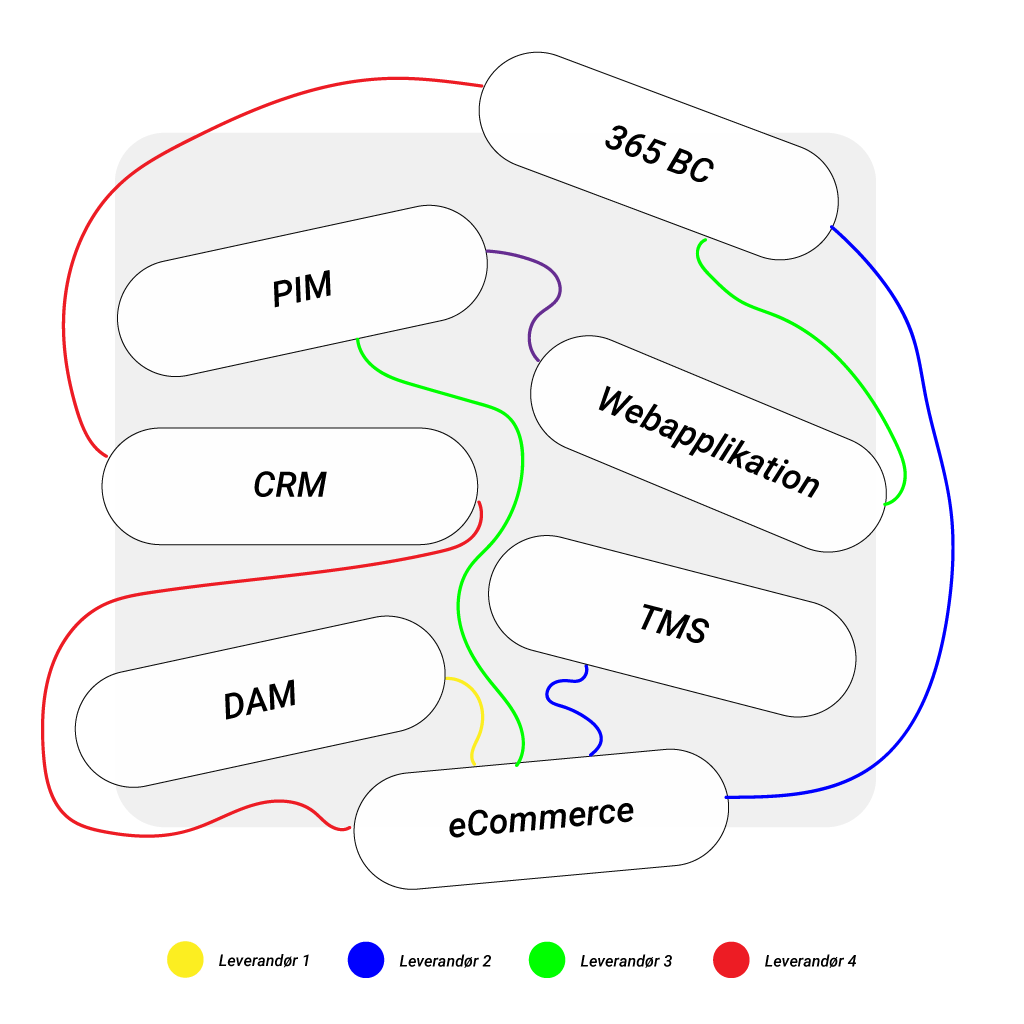
365 BC at the centre
When you integrate your ERP system with other systems, you get one overview of all the important information you need, no matter where it comes from.
That means you can:
- Increase efficiency in your business
- Get better insight and visibility into your processes
- Make better decisions based on current data
So in short, ERP integration is about getting your systems to work together, so you can get the most out of your company’s tech stack.
Read more:
What is Dynamics 365 Business Central?
Why ERP integration matters
Imagine a working day where all your company data lives in harmony. Where there are no data silos creating redundancy, inefficiency and inaccuracy. Sounds like a dream, right?
That is exactly what ERP integration can do for you.
By integrating your ERP system with other systems, you can:
- Remove data silos and ensure all your data is synchronised and up to date.
- Reduce the dependence on manual processes, which lowers the workload and increases operational efficiency.
- Get access to real-time data, which is essential for making accurate and fast decisions.
- Create a seamless customer journey by connecting your ERP system with customer-facing systems such as CRM, e-commerce and customer service.
Think of it this way:
❌ If your systems do not talk to each other, your staff have to enter data manually from one system into another. That is not only time-consuming, it also increases the risk of errors.
✅ Last but certainly not least, a well-integrated ERP solution is also your best friend when it comes to creating a seamless customer journey.
✅ By connecting your ERP with customer-facing systems such as CRM, e-commerce and customer service, you can ensure a smooth experience for your customers from start to finish.
Read more:
Dynamics 365 Business Central integration
Methods of integration
There are different methods for integrating your ERP system with other software solutions. Here are a few of the most popular ones:
Custom integrations
Tailored solutions built specifically to match software APIs with your ERP system.
This is something we have helped companies such as Le Klint, Plus Plus and KaffeKapslen with. The advantage of custom integrations is that they are adapted precisely to your needs and systems.
Vendor-built or native integrations
Vendor-built or native integrations are out-of-the-box solutions that allow a connection to specific applications without extra subscription costs. Drawbacks of native Shopify integration in Business Central
It is an easy and fast way to get started with integrations if your systems support it.
Integration platform as a service (iPaaS)
iPaaS solutions are cloud-based platforms that build and run integrations between systems.
It is a flexible and scalable solution well suited to companies with many different systems and integrations.
Point-to-point integration
Point-to-point integration is a direct connection between two systems using custom code.
It is a suitable solution for basic systems with few integrations, but it can quickly become complex and hard to maintain as the number of integrations grows.
Enterprise service bus (ESB)
An ESB is an integration platform that manages the integration of different systems.
It is often used in complex on-premises architectures to handle many integrations across different systems.
Benefits of integrating with the ERP
This guide could be more than twice as long if we covered every benefit, so here is an overview of the biggest ones:
Automation
Automation means your staff can focus on the tasks that genuinely create value for the business.
Sharp data accuracy
Get real-time data and synchronisation across departments. That ensures everyone works from the same up-to-date information.
Centralised data
With centralised data, your organisation can easily connect new web applications or CMS solutions without having to reinvent the wheel.
Uniform data
Integration improves internal communication by making data available across teams and silos. Uniform data for everyone.
Scalability
As your business grows, it is important to be able to scale your business processes along with your ERP integration.
Challenges without ERP integration
Imagine a world where your data is spread across different systems that do not talk to each other.
Sounds like an IT specialist’s worst nightmare, doesn’t it?
Bigger challenges without ERP integration
Unfortunately, that is the reality for many companies that have not integrated their ERP system with the rest of their tech stack. So here are some of the biggest challenges you can run into without ERP integration:
Data silos
Inconsistent data silos lead to redundancy, inefficiency and inaccurate data. Older ERP data can be stuck in old, local data silos, while newer integrations sit in the cloud. It is a bit like having a treasure chest full of gold, but the key is hidden somewhere you cannot find it.
Slow manual processes
Relying on manual processes for transferring data between systems increases the workload and hampers efficiency. And let us not forget the risk of typing errors. It is a bit like playing Telephone with your data – you never know what comes out at the other end.
Lack of real-time data
Disconnected systems mean delayed information exchange, which can lead to inefficient business processes. It is a bit like navigating with a map from the 1800s – you may get there, but it takes longer, and you risk getting lost along the way.
Inability to achieve strategic initiatives
Without integration it is difficult to implement and achieve strategic goals that require coherent data and processes. It is like trying to bake a cake without mixing the ingredients – the result is never quite what you hoped for.
To sum up:
Without ERP integration you can end up wasting time, money and resources navigating a mess of disconnected systems and processes. But don’t worry. We are here to help you get things under control.
Practical examples of integrations
Here are some hypothetical but concrete examples of what ERP integrations can look like in practice.
E-commerce
Imagine you run a webshop on Shopify. By integrating your ERP system with Shopify, you can automate the whole process from order to delivery.
When a customer places an order in your webshop, the order data is transferred automatically to your ERP system. From there you can easily handle inventory management, invoicing and shipping – without entering data manually. That saves time and minimises the risk of errors.
Supply chain management
Integrating your ERP with a supply chain management (SCM) system can be a game changer for your supply chain.
With an integration you can:
- Optimise inventory management
- Improve forecasting
- Streamline communication with suppliers
- Automate the reordering of goods
All things that ultimately improve efficiency and the bottom line in your business.
Read more: Supply chain automation
Customer relationship management (CRM)
Do you want to ensure a seamless customer journey and deliver good customer service? Then integration between your ERP and CRM system is the way forward.
By connecting these systems, your sales reps and customer service staff get access to important customer data directly in the CRM system.
That could be, for example:
- Order history
- Invoicing details
- Delivery status
With this information at hand, your staff can deliver a far more personal and efficient service.
Finance and accounting
Last but not least, integration between the ERP and accounting software can automate many of your financial processes.
Think of things like:
- Invoicing
- Posting payments
- Reconciling accounts
By letting these processes run automatically, you not only save time – you also significantly reduce the risk of human error.
Read more: Dynamics 365 Business Central integration
Examples of data flows
Here are some hypothetical but concrete examples of what ERP integrations can look like in practice.
Order processing
Imagine a customer places an order in your Shopify webshop. With an integration between Shopify and your Dynamics 365 Business Central, the order data is sent automatically to the ERP system. Here the stock level is updated and an invoice is generated. Smooth, right?
Inventory management
Your ERP system and your warehouse management system (WMS) can synchronise stock data, so you always know what you have in stock. That includes when you receive goods, move them around the warehouse and ship them out to customers. No more manual work.
Financial transactions
When you integrate your ERP system with your accounting software (for example e-conomic and Business Central), you can transfer financial data such as payments and expenses automatically. That way you make sure your bookkeeping and reporting are always spot on.
Customer service
By synchronising customer data between your CRM system and ERP system, you give your customer service staff access to always up-to-date information about orders, invoices and customer history. That lets them deliver the best service.
Production
If you integrate your ERP system with your manufacturing execution system (MES), you can transfer data about production plans and material consumption. That helps you optimise your production processes and avoid waste.
HR
Keep track of your employees by synchronising data between your ERP system and HR system. That way you can be sure payroll, time registration and employee administration are always up to date.
Supply chain
With an integration between your ERP system and supply chain management system (SCM), you can synchronise data about purchasing, suppliers and stock levels. Purchase orders are updated automatically, and stock levels are adjusted in real time. Efficient, right?
Sales and marketing
Want better control of your marketing campaigns? Then synchronise sales data and campaign results between your ERP system and marketing automation tools such as HubSpot or Marketo. That lets you target and analyse your campaigns better.
Project management
Keep your projects on track and within budget by synchronising project data (time registration, costs, resource management) between your ERP system and project management tools such as Microsoft Project or Asana.
Quality control
Avoid quality problems by synchronising data about product quality and inspections between your ERP system and the quality management system (QMS). That lets you quickly identify and solve any problems.
E-commerce
Give your customers the best experience by synchronising product data, prices and stock levels between your ERP system and e-commerce platforms such as Shopify/Shopify Plus, Magento or WooCommerce. That way customers always see up-to-date information in the webshop.
As you can see, there are many options when it comes to integrating your ERP system with other systems. It is just a question of working out which data flows make sense for your business. Something we also help with.
The most popular e-commerce integrations
- Magento Magento integration
- WooCommerce WooCommerce Dynamics 365 Business Central integration
- Shopify Shopify integration
Things to consider first
Before you throw yourself into an ERP integration, there are a few things you should consider. It is a fairly large project after all, and you want to make sure you choose the right solution from the start.
Choose the right integration method
First and foremost, you need to consider which integration method best suits your company’s needs and resources.
There are both prebuilt and customisable integrations, and the choice depends on the complexity and scalability of your systems.
- Prebuilt integrations are quick to implement and require less technical expertise, but they are less flexible.
- Customisable integrations take longer to develop, but they can be tailored to your specific needs.
Map your data and data flows
It is also a good idea to think about which data you have available and which data flows need to be integrated.
- Which systems do you have, and what data sits in each system?
- How should data flow between the systems?
By mapping this out in advance, you can ensure a smoother integration process.
Involve the right stakeholders
Last but not least, make sure to involve the relevant stakeholders in the planning and implementation of the ERP integration.
That could be:
- The IT department
- The finance department
- The sales department
- The marketing department
Implementing ERP integrations is a journey that requires careful planning, the right partners and a clear strategy. But the reward is a more agile, efficient and data-driven business that is ready for the challenges ahead.
Take the first step towards a more integrated future today and get in touch.