Skip to content
Connectify

✦Solution

Machine fleet customer portal – digital self-service for your equipment

Control over rental, sales and service in one place. With a machine fleet customer portal your customers get a full overview and can order, plan and follow rental agreements themselves. Everything is integrated directly with 365 Business Central.

  • Control over rental, sales and service
  • Integrated directly with Business Central
  • Tailored to your business

In short

  • Connects: Connectify and Business Central
  • Includes: Search and book equipment, Real-time availability, Agreements and invoices, Damage and service, Deliveries and tracking, Users and roles
  • Delivered by: Connectify, integration specialists since 2014
  • Pricing: a fixed monthly price per integration, including operation and free support –see pricing

What it does

Why invest in a machine fleet portal?

Trigger

New order in Connectify

Action

Validate and transform

Result

Created in Business Central

Self-service around the clock

Customers can find, order and manage their equipment themselves – without having to call or wait for an answer.

Sync logLive
  • Orders transferred
  • Stock updated
  • Price rejected – item no. missing
  • Price retried and transferred

Overview of the entire machine fleet

See active rentals, upcoming deliveries, service agreements and history – all in one place.

ConnectifyBusiness Central
  • Order no.Sales order
  • Customer emailCustomer
  • SKUItem no.
  • Price incl. VATUnit price

Less admin, fewer errors

Integration to ERP and the warehouse system ensures everything is up to date and correct – from availability to invoicing.

Features

Features for equipment sales, rental and service

Features

Search and book equipment

Customers search for and book equipment directly in the portal – orders and reorders are done in a few clicks.

Features

Real-time availability

See availability in real time via integration to the warehouse system and ERP.

Features

Agreements and invoices

Customers download agreements, invoices and rental contracts themselves.

Features

Damage and service

Report damage and book service visits online.

Features

Deliveries and tracking

Follow deliveries and track equipment on the construction site.

Features

Users and roles

Create users with different roles and access levels.

Customer portal for machine rental and sales

The portal is tailored to companies that rent out and sell construction equipment.

  • Buying and renting equipment with your suppliers
  • A full overview with a machine fleet
  • Adapt the solution so it matches the needs you want covered
  • Service and maintenance handled easily in the platform

Features built for the real world

With a customer portal your customers get access to self-service around the clock – and your sales department is freed from manual emails and phone calls.
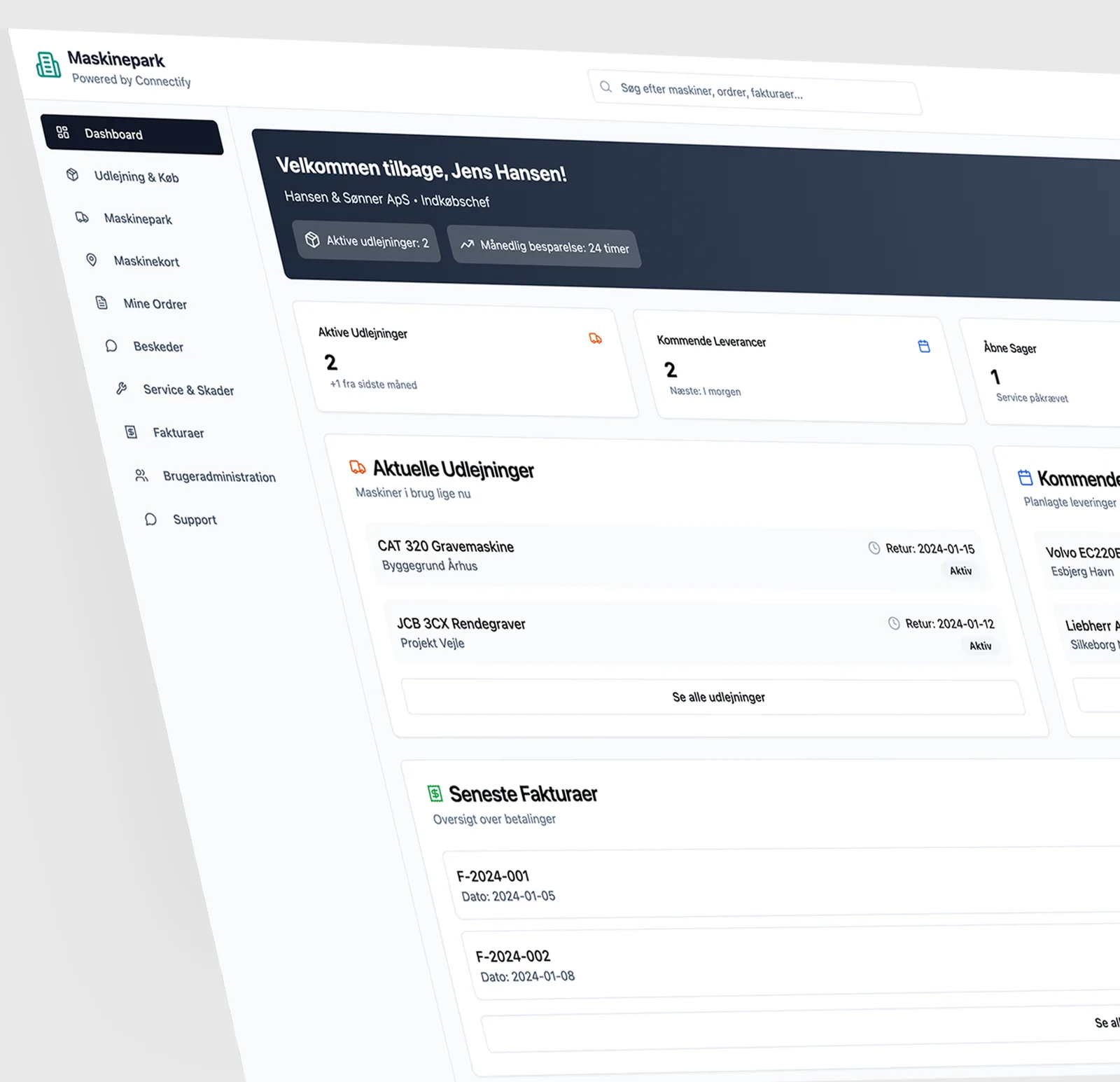
Dashboard in the machine fleet customer portal

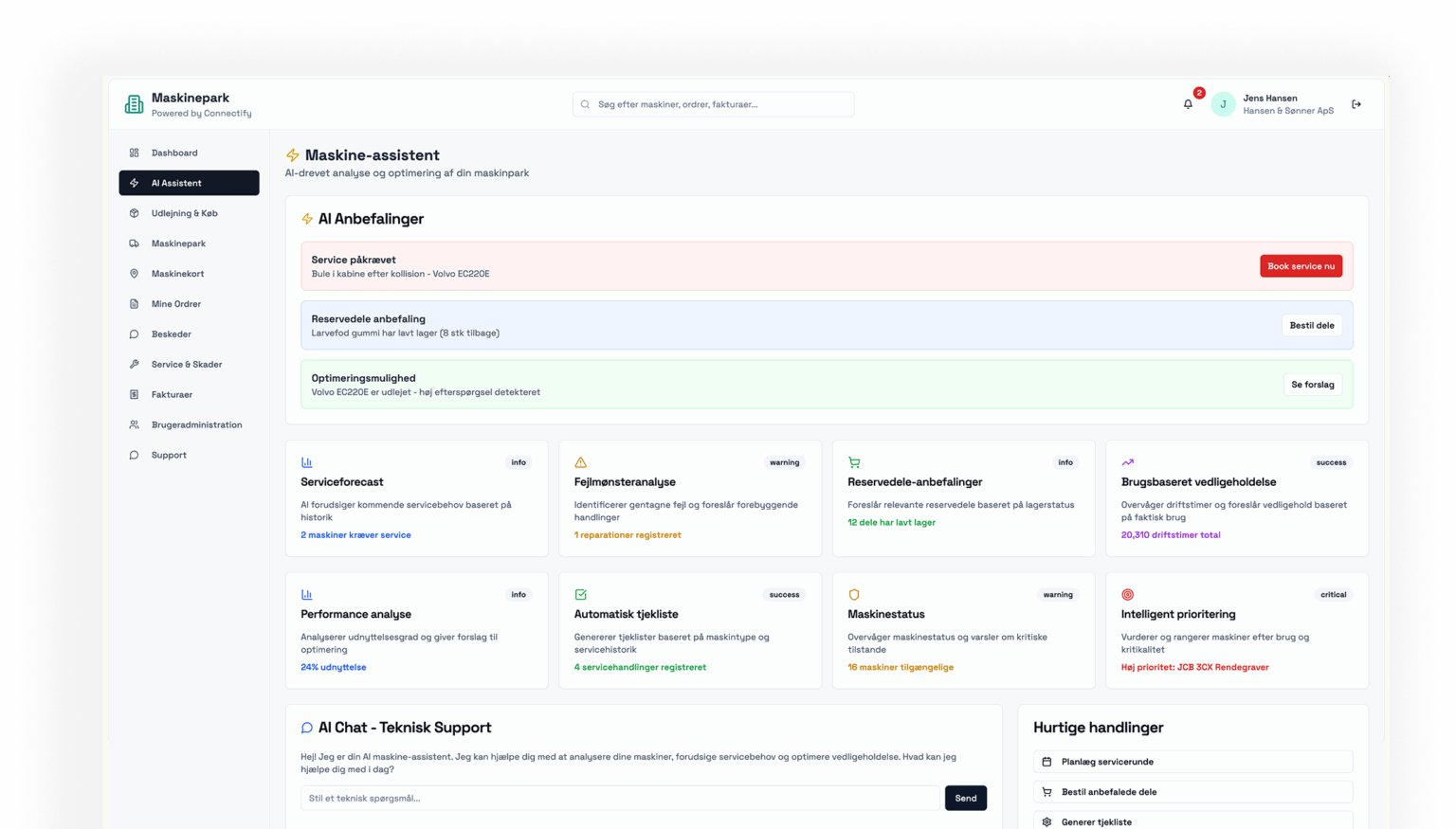
AI assistance – so you do not have to think of everything yourself

Let the assistant – with insight into your specific business – help you identify where the focus really belongs. We free up time for strategic work and remove unnecessary intermediate steps.
Try our demo

AI assistant in the machine fleet customer portal

Why invest in a machine fleet portal?

The good question is – what do you, or rather what do your customers, get out of a machine fleet portal?

A scalable solution

More users, more projects, more equipment – the portal grows with your business.

A better customer experience

Professional and transparent communication creates confidence and loyalty among your customers.

Faster order handling

Orders and reorders are done in a few clicks – both from the office and from the construction site.

Integrations to your systems

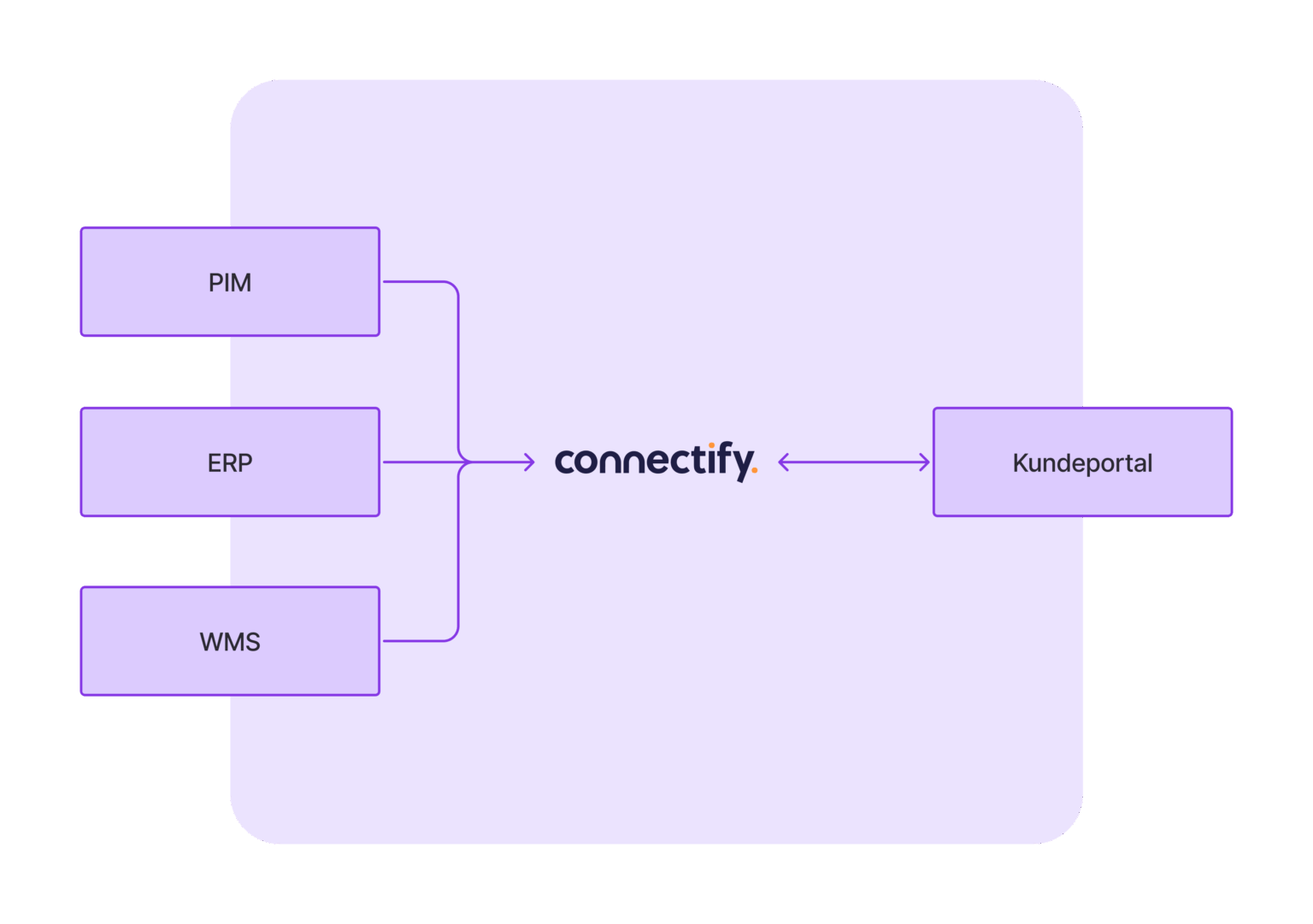
We connect your customer portal with your ERP, WMS, PIM and CRM, so all data is updated automatically and you avoid duplicate work. That means:
  • Better customer service
  • Fewer errors and less missing information
  • Faster order handling
  • Full digital traceability

The customer portal integrated with PIM, ERP and WMS via Connectify

What does a machine fleet customer portal cost?

The price depends on your needs and system landscape. The customer portal itself is developed as a tailored solution based on your requirements.

One-off costs (development)

Description Hours Price per hour Total
Customer portal (UI, login, product overview, invoices, user management) 40 hours DKK 950 DKK 38,000
Rental module (calendar, pricing logic, stock status) 20 hours DKK 950 DKK 19,000
Service and damage module 10 hours DKK 950 DKK 9,500
Design, testing and support 10 hours DKK 950 DKK 9,500

Total one-off cost: DKK 76,000 excluding VAT

What do the one-off costs cover?

The one-off costs are about building a solution that fits your business precisely:

  • Design and development of the customer portal itself – adapted to your needs and workflows
  • Setting up features such as booking, order overview and damage handling
  • Testing, quality assurance and adjustments before go-live

Ongoing costs (subscription)

Subscription type Price per month
Integration to Business Central DKK 5,000
Server and hosting DKK 1,800

Total monthly subscription: DKK 6,800 excluding VAT

What does the subscription cover?

The subscription ensures your customer portal always works with your systems and runs reliably:

  • Operation and maintenance of the integrations – for example to Business Central and warehouse systems
  • Hosting and monitoring of the portal on secure server infrastructure
  • Ongoing updates and free support as part of the integration agreement

A tailored customer portal – adapted to your business

We build the customer portal based on your business, workflows and system landscape. The solution is adapted to your needs – both functionally and technically – so you get exactly the features that create value.

AI assistant

  • AI recommendations – Shows service needs, spare part status and optimisation opportunities based on data analysis.
  • Service forecast – Predicts upcoming service needs based on history.
  • Fault analysis – Identifies patterns in faults and suggests preventive actions.
  • Spare part recommendations – Suggestions for reordering based on stock status.
  • Usage-based maintenance – Maintenance plan based on actual use (operating hours).
  • Performance analysis – Analysis of machine utilisation and suggestions for improvement.
  • Automatic checklist – Generates maintenance checklists for each machine.
  • Machine status – Overview of current machine conditions and warnings.
  • Intelligent prioritisation – Ranks machines by criticality and user needs.
  • AI chat – technical support – Interactive chatbot for technical questions and assistance.

Messaging system

  • Internal communication – Conversations between team members about machines, orders and projects.
  • Prioritised messages – Messages are shown with colour codes for priority (low, medium, high).
  • Filtering by topic – Conversations can be filtered by category such as machines, orders and so on.

Machine fleet

  • Machine overview – Full overview of all owned machines, including status and availability.
  • Availability and rental – Shows which machines are available, rented out or need service.
  • Search and filter – Quickly find machines by criteria such as status and type.
  • Service status – Status and history for each machine – including hours and repairs.

Invoice overview

  • Total invoiced and open balance – Overview of all payments, arrears and average payment time.
  • Invoice status – Clear display of invoices as paid, open or overdue.
  • Download & view – Quick access to view or download invoices as PDF.
  • Search & filter invoices – Find invoices quickly by number or status.

Dashboard

  • Main overview – Shows key figures such as the number of active rentals, open cases and latest invoices.
  • Warnings and reminders – Get notified about machines that need service, are expiring or have deliveries on the way.

Service & damage

  • Create a damage report – Describe, prioritise and document damage with photos.
  • Book service – Schedule maintenance directly from the platform.
  • Emergency support – Get straight through to technical support via a hotline.
  • Service overview – List of active and completed service cases with status.

Rental & purchase

  • Find and rent machines – Search for and choose machines based on location, model and price.
  • Add to order – Rent machines directly from the overview.
  • Rental price and location display – Clear price overview per day and geographical location.

Orders and deliveries

  • My orders – Overview of active and previous orders.
  • Upcoming deliveries – Scheduled deliveries shown with date and location.
  • Rental status – Shows which machines are out and when they are due back.

We've got the answers

Frequently asked questions

Who is the customer portal for?

The portal is tailored to companies that rent out and sell construction equipment.

Which systems can the portal be integrated with?

We connect the customer portal with your ERP, WMS, PIM and CRM, so all data is updated automatically and you avoid duplicate work. The portal is integrated directly with Dynamics 365 Business Central.

What does a machine fleet customer portal cost?

The price depends on your needs and system landscape. In our example the one-off development cost is DKK 76,000 excluding VAT, and the monthly subscription for integration to Business Central plus server and hosting is DKK 6,800 excluding VAT.

Can I see a demo?

Yes. You can try our demo of the customer portal.

See all integrations +

Request a call

Let's talk about your data flow

Want to know more about Connectify, or get answers about your integration? Fill in the form and one of our integration specialists will call you back.

  • A free review of your needs
  • Fixed price – no expensive support hours
  • Danish integration specialists