
Guide
What is iPaaS? Everything you should know
iPaaS stands for Integration Platform as a Service. Here we explain what it is and what you can use an iPaaS solution for.
8 min read
What is an iPaaS – solution architecture with Connectify
Maybe you have come across the abbreviation iPaaS, wondered what it covers, googled it, and now you are here. You have come to exactly the right place. iPaaS sounds a bit like the next big Apple product, but in reality it is something else entirely.
iPaaS stands for Integration Platform as a Service, and we will explain what it is and what you can use an iPaaS solution for.
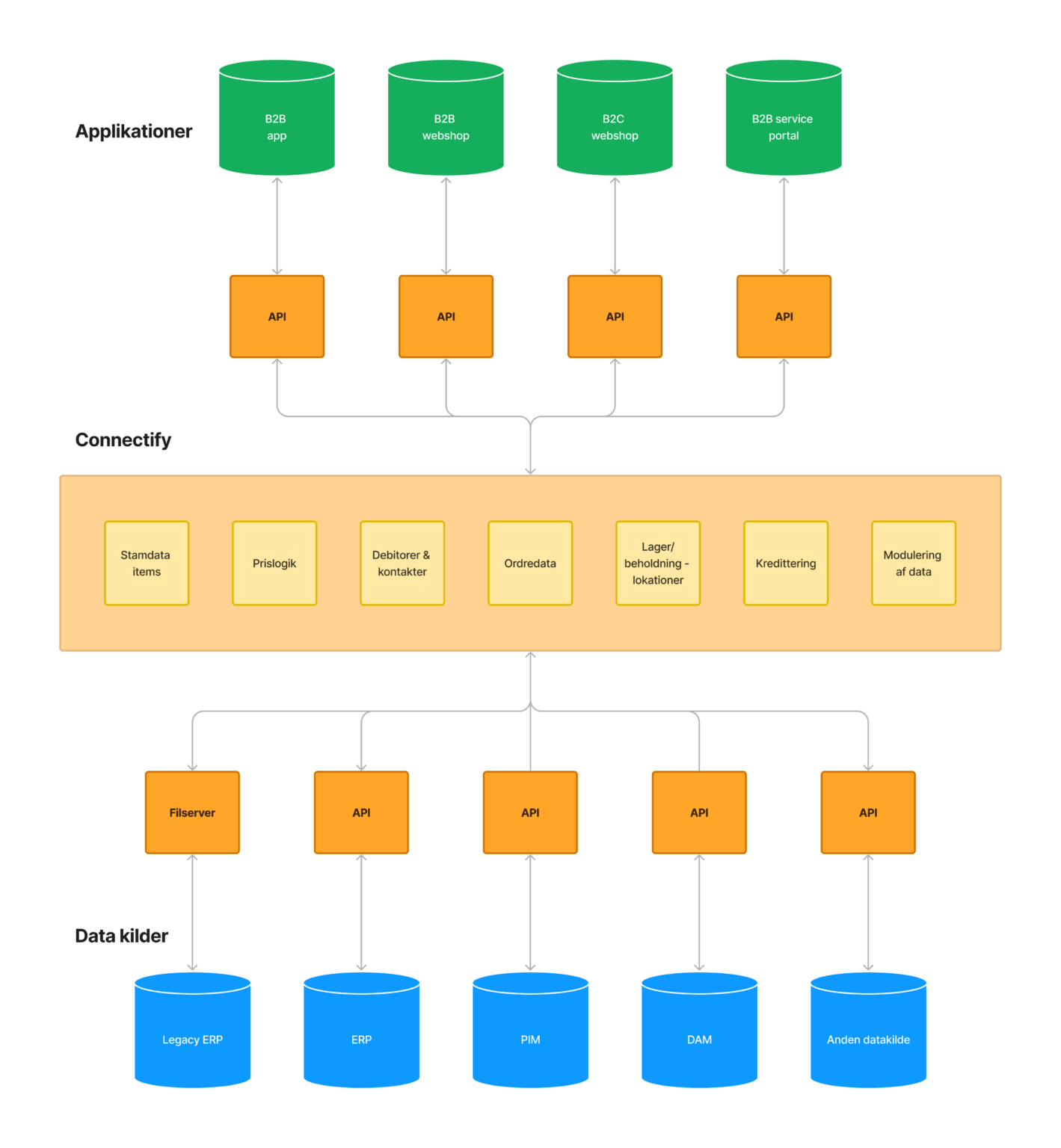
What is an iPaaS?
As written above, iPaaS stands for Integration Platform as a Service. The term can sound convoluted, but when you simplify it a little, it makes good sense.
An integration platform is a bridge built between your different applications, so they talk to each other better, send the right data back and forth and generally work together more seamlessly.
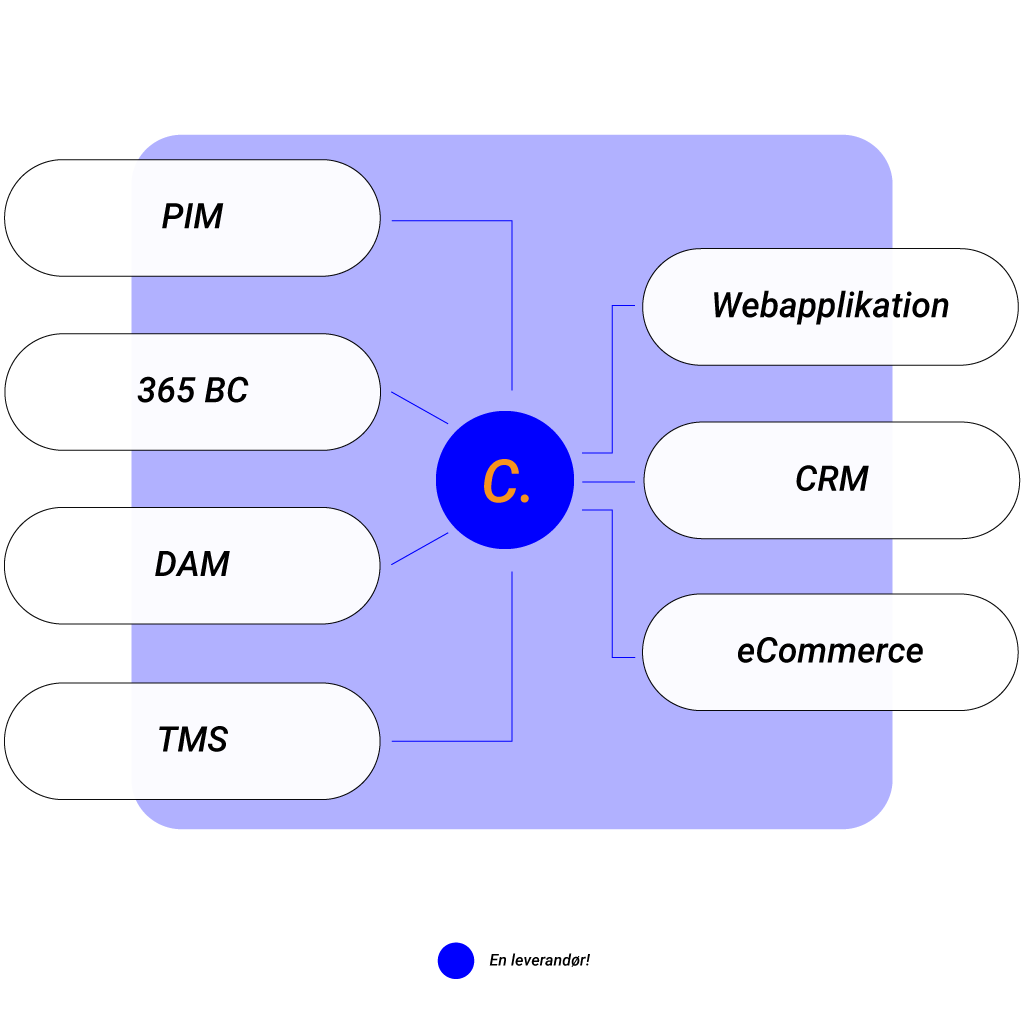
iPaaS use cases
iPaaS is used across a wide range of areas that involve connecting systems and exchanging data between them. Here are a few examples of use cases for iPaaS:
ERP integration
Synchronise data between your ERP system and other tools such as CRM, PIM, e-commerce platforms and EDI databases. iPaaS makes sure information such as order confirmations, product data and customer details flows smoothly across the systems.
Popular ERP integrations:
Dynamics 365 Business Central integration
E-commerce integrations
Integrations that connect your webshop with other data sources. The classic example is the connection between your ERP and webshop platform. We distinguish between B2C and B2B integrations, which differ in business logic and data.
Popular e-commerce integrations:
Data analysis and BI
iPaaS can gather data from different sources and transform it into a format that business intelligence tools can use. That gives companies the ability to get a single view of their data and make more data-driven decisions.
Automation of business processes
Integrate older systems that were not originally designed to communicate with modern applications. That makes it possible to use data from these systems in new contexts.
Sales and customer management
By integrating data from different customer-related systems (CRM, marketing automation, support), iPaaS can contribute to a more consistent and personalised customer experience across all touchpoints, and strengthen sales and customer satisfaction.
Dynamics 365 Business Central and your webshop
The integration platform makes sure the right data is created automatically in both systems, and that the correct information flows between the two destinations.
In that way, the integration minimises manual duplicate work by seamlessly merging the two applications.
Integration methods in iPaaS
There are a number of different integration methods that can be used in iPaaS, each with its own advantages and drawbacks.
Choosing the right integration method depends on a number of factors, including:
- The type of data to be integrated
- The applications to be integrated
- The integration features required
- The budget and the timeframe
It is important to choose an integration method that suits the specific situation and can deliver the information the business needs.
In addition to the methods mentioned, there are a number of other integration methods that can be used in iPaaS. It is important to look into the different options and choose the method that best meets the specific needs in the given situation.
API integration
A modern and popular method that uses application programming interfaces (APIs) to connect applications and exchange data.
API integration is a flexible and scalable method, but it can be complex to implement and maintain.
Data integration
Many systems hold data in different shapes, which is why ETL is used to extract, transform and load (ETL) data from different sources into a central repository.
Data integration can be useful for consolidating data from different sources, but it can be time-consuming and expensive to implement.
Event-driven integration
A method that involves sending and receiving events between applications. Event-driven integration is a fast and scalable method, but it can be complex to design and implement.
File-based integration
Do you have older systems? Then this method is necessary for exchanging data files between applications. File-based integration is a simple and reliable method, but it can be inefficient and hard to scale.
An effective tech stack
The whole idea behind an iPaaS solution is to create a more effective tech stack. Your tech stack is the set of applications your company uses to deliver your service.
An example of a tech stack could be Shopify, Dynamics 365 Business Central, an email system, a payroll system and a Slack channel.
Read Guide: system architecture in a fashion company & best practice
Get more out of your tech stack
The integration platform lets you get far more out of your tech stack than if you had to do everything manually. For example, it is a well-known problem that you have to create an item both in your ERP system and in Shopify to make them work together.
An integration platform makes sure you only have to do it in one of the applications, and the integration then makes sure the other application receives the same data.
Save time and increase efficiency
Most companies spend enormous amounts of time in many different systems, applications and on several different websites. An integration platform makes sure you do not have to spend as much time navigating several different digital landscapes.
It makes sure you get the most out of your different applications and increases the efficiency of your work through automation.
Save plenty of resources with an iPaaS solution
An integration platform can save you an enormous amount of resources. Let us say you work in a larger e-commerce company where large volumes of data flow between your applications and systems. An integration platform makes sure effective bridges are built between the different applications. You save huge amounts of time, because you know your data flows safely between the applications. Your colleague has the same experience – in fact your whole team, and the other teams in the company, do too.
An integration platform does not only mean that YOU spend less time, but everyone else too. The amount of time, clicks and hassle drops for everyone.
Secure data – seamless automation
Not to mention security. Data never lies. The figures that go in and out of your systems have to be handled with precision and care. If you make a mistake in your data, it can potentially cost you money, plus the time it takes to correct the error. Automating your data makes sure errors do not occur.
Leave your data safely in the hands of your iPaaS solution and let go of the worry and the fear of typing something wrong.
Connectify as an iPaaS solution
If you are curious about what an iPaaS solution can do for you, read on. Connectify are experts in integrations and help many different companies get the most out of their systems.
With deep experience in the field, Connectify can both make sure your integrations get off to a good start and help you build a better foundation than the one you already have. It is never too late for solid integrations. We write more about Connectify as a complete integration platform.
Automate with an iPaaS solution
An iPaaS solution from Connectify makes it easy for you to keep track of your integrations. In reality you have to do almost nothing. We set it up for you free of charge and provide free support over email for as long as you are a customer. That way we make sure you get the best possible service and feel confident working with your new integrations.
With Connectify on the sidelines you will save both time and money, whichever solution you choose. Connectify definitely has a solution that fits you.
We build bridges between many different applications and systems, and have helped a range of companies, such as Shark Gaming.
Systems we can integrate with
E-commerce
- Magento integration to Dynamics 365 Business Central and Dynamics NAV
- Shopify integration to Dynamics 365 Business Central and Shopify Dynamics NAV
- Shopware
- WooCommerce
ERP
- Dynamics NAV
- Dynamics 365 Business Central
- TRIMIT integration
- Infor M3
PIM
- Struct
- Plytix
Other
- GS1 integration
- Amazon integration
- B2B customer portal
If you connect these systems with each other, you have a solid foundation for a great data flow and major savings in your business.
Get in touch if you want to know more about integrations and iPaaS solutions. We are always happy to share our detailed knowledge with the people who can really use it.
If you are interested in seeing our price packages and what they include, click here. The price of automating large parts of your and your colleagues’ work has never looked better.
