Features
Forecasts
A forecast calculated from your sales history and shown alongside actual sales and the same period last year.

✦Demand planning
Which items should you buy, and when should you order them? Connectify uses the sales from your webshop, marketplaces and B2B for forecasts, stock analysis and purchase suggestions. You still place the orders in Business Central.
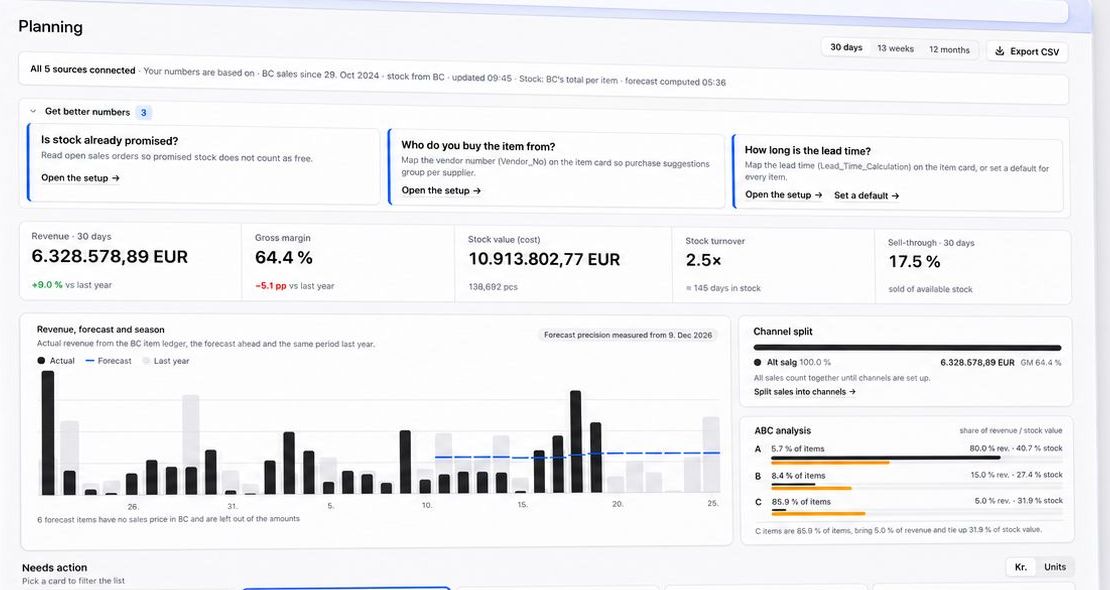
Planning happens in Connectify, and purchasing happens in Business Central. This is what a typical review looks like for the buyer.
01 · Overview
Actual revenue, forecast and the same period last year sit side by side, so you can see whether the latest period stands out.
02 · Prioritise
Sold-out items with sales, items that will soon run out and items that must be ordered within seven days each have their own list.
03 · Purchase
Purchase suggestions are grouped by supplier with lead time and suggested value. The order is created in Business Central, where you also manage the supplier.
Features
Features
A forecast calculated from your sales history and shown alongside actual sales and the same period last year.
Features
Lists of sold-out items with sales in the last 30 days and items that, at the current sales rate, run out within 14 days.
Features
Suggestions grouped by supplier with lead time, order date and suggested purchase value for the next 30 days.
Features
Each group's share of revenue compared with its share of stock value, so you can see where stock does not follow sales.
Features
Stock value at cost, stock turnover and a list of items in stock without sales in the last 90 days.
Features
Sales from webshop, marketplaces and B2B are counted once, and the channel split shows where changes come from.
When sales come from a webshop, marketplaces and B2B customers, purchasing needs one view of sales and stock. Connectify has built-in demand planning that uses your data to calculate forecasts, show how stock develops and prepare purchase suggestions. Planning happens in Connectify, and you place the orders in Business Central.
That gives the buyer one place to start the day. Which items need action now? Which are about to run out? And where is stock sitting that does not sell?
Demand planning is the work of estimating future demand and using it to plan stock and purchasing. A sales forecast is part of that work, and it then has to be weighed against stock on hand and the time it takes to get new goods in.
An item with growing sales and a three-week lead time needs a different decision from an item that has not moved for months. That is why the buyer needs to see both demand and its effect on stock.
Business Central supplies sales and stock data, and your integrations connect the ERP system with your sales channels. Connectify handles demand planning and presents the result in the planning module. You then use Business Central to create and manage the orders with your suppliers.
Microsoft also describes its own sales and inventory forecasting in Business Central. When you choose Connectify for planning, the buyer works from Connectify’s forecasts, analyses and suggestions. Read more about our Business Central integration.
Total sales do not tell you which items to order today. Connectify therefore gives you five ways into the range: items in the purchase suggestions, sold-out items with sales in the last 30 days, items that will soon run out at the current sales rate, items in stock with no sales in 90 days, and the variants that make up a large share of units sold.
The buyer picks a group and works through the items in that list. It helps when the range is too large to check item by item.
The planning view shows actual revenue, forecast and the same period last year. If you have run a campaign or changed the range, bring that knowledge into your reading of the forecast. A period with sold-out items, for example, may have held sales back even though customers still wanted the product.
Connectify also shows when the data was updated and when the forecast was calculated, so you know what your decisions are based on.
The forecast sits next to key figures for revenue, margin, stock value and stock turnover. The ABC analysis shows how each group’s share of revenue relates to its share of stock value.
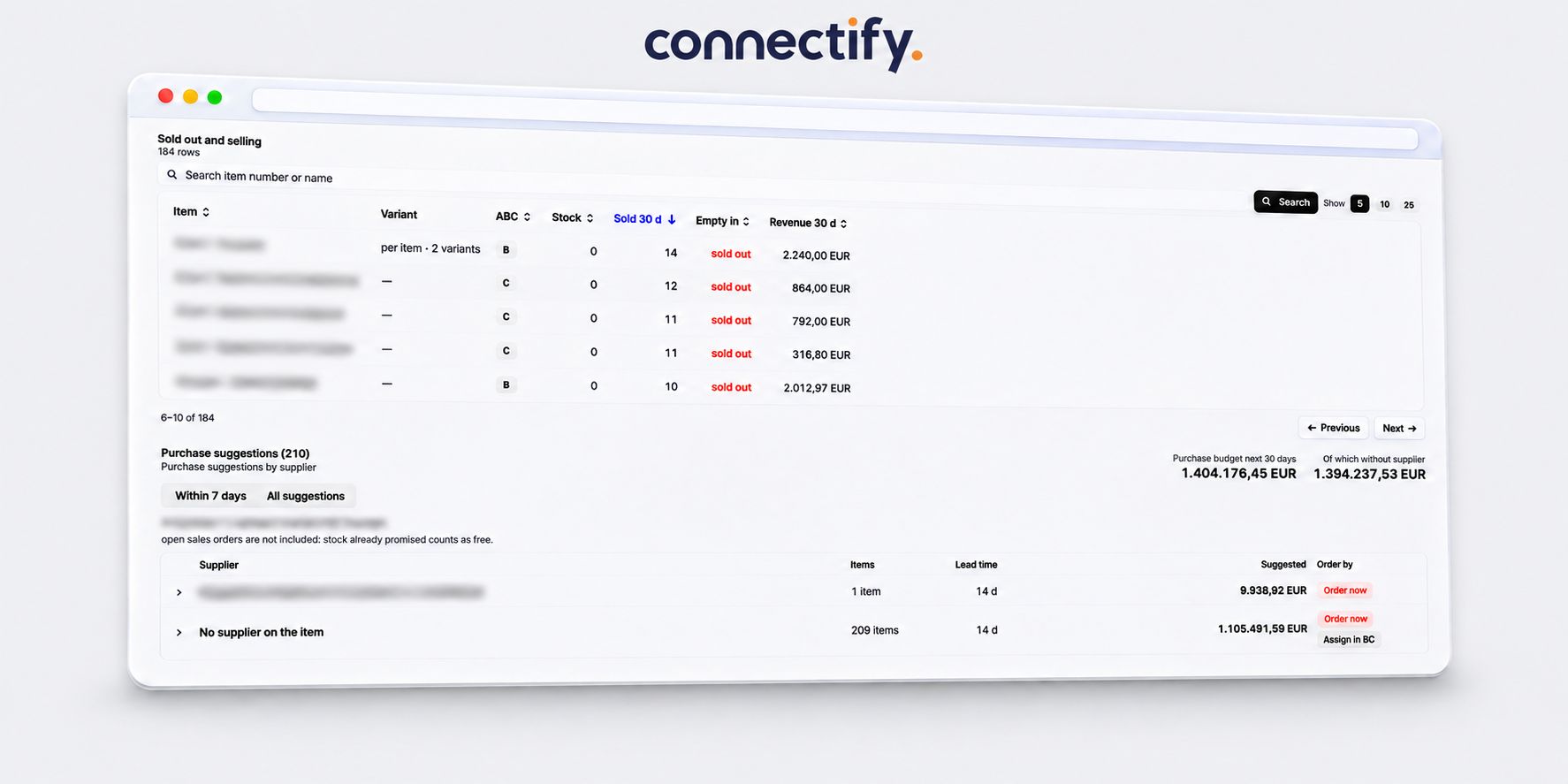
Purchase suggestions are grouped by supplier and show lead time, suggested purchase value and order date. The purchase order itself is handled in Business Central.
During setup we agree which sales data to include, how items and sales channels are identified, and how stock should be read. Suppliers and lead times must be linked to the relevant items, and open sales orders must be handled so that stock already promised to customers is assessed correctly. It all builds on the connections between your systems that our integration platform provides.
We've got the answers
Demand planning is part of the Connectify dashboard and is included when you have a Shopify and Business Central integration with us. If you sell in physical stores with Shopify POS, you also get the store overview.
Demand planning is the work of estimating future demand and using it to plan stock and purchasing. The forecast is weighed against current stock and the time it takes to get new goods in.
Yes, in this workflow Connectify takes over the planning. Forecasts, stock analysis and purchase suggestions live in Connectify, while purchase orders are still created and handled in Business Central.
Sales history and stock from Business Central, suppliers and lead times from the item cards, and open purchase orders. During setup we agree which sources cover your sales, so the same order is only counted once.
Yes. When sales from every channel end up in Business Central, Connectify uses the combined sales as the basis for planning.
Not at the moment. Demand planning is built on sales, stock, suppliers and purchase orders from Business Central, so it only works with Business Central.
Items and variants must be matched correctly between systems, and suppliers and lead times must be set on the items in Business Central. We go through the data with you during setup.
Solution
Connectify combines Shopify POS sales with cost price and stock from Business Central. You get revenue, margin, stock and peak hours for every store, targets and alerts you set yourself, and suggestions for where to move stock.
Read more

ERP
Integrations between your ERP and your e-commerce solutions – for Magento, Shopify Plus and WooCommerce. We connect Business Central with the systems your business runs on.
Read moreE-commerce
Shopify integration with Dynamics 365 Business Central, Dynamics NAV, Infor M3 and TRIMIT. Orders, stock, items, prices and customers are synced automatically between Shopify or Shopify Plus and your ERP – built around your workflows and maintained by us.
Read moreRequest a call
Want to know more about Connectify, or get answers about your integration? Fill in the form and one of our integration specialists will call you back.